Quick add tasks to Obsidian on Android
I’m using Automate on Android, but I’m sure you can do this with MacroDroid too.
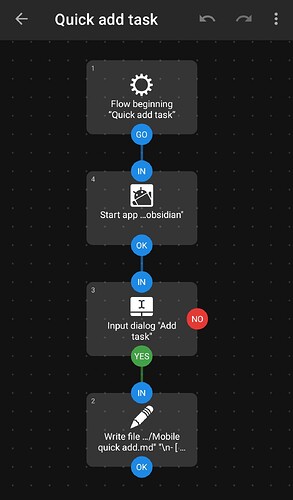
Here’s a video. I tell Obsidian to launch, and then pop up the input box for my new task. By the time I’ve finished typing the task, Obsidian is already opened and syncing away. This has completely solved any sync-related quick-add issues for me.
Note: I am still directly editing the Markdown file as per the first post, I’m just also opening Obsidian so it can start syncing while I enter my text.

Here’s the Automate flow, very simple:
[
And the Automate flow itself if you want to import it:
https://drive.google.com/file/d/1O1_k5vtFnaV8bUAMXtIIo3DAvYvAREA-/view?usp=drivesdk